Top 5 Auto Support and Resistance Indicators on TradingView (2026)

Alright, listen up. Finding solid support and resistance zones is crucial, but drawing them manually? That’s a pain, and honestly, you’ll miss stuff. I’ve been digging into the best indicators on TradingView that automatically plot these key levels using pure price action. This is my rundown for October 2026.
#5: Pivot Points Standard (TradingView built-in)
Pivot Points are a classic for a reason. They give you a clear set of levels based on the previous day’s high, low, and close. You get your main pivot, then R1, R2, R3 above, and S1, S2, S3 below. I’ve used these for years, especially for intraday scalps, because they offer a consistent framework. You can switch between different types like Traditional, Fibonacci, Camarilla, Woodie, and more, which is handy. The problem is they’re static and historical. They don’t react to current price action until the next period, so they can feel a bit rigid when volatility kicks in. It’s a good baseline, but it’s not truly adaptive to changing market conditions. Also, they’re just lines, not zones, which means less flexibility.
The tool I use for this: Support and Resistance Scanner. Real-time Telegram alerts when stocks approach critical S&R levels across the whole market. Get The Scanner →
Pros:
Provides consistent, widely recognized daily levels using various calculation methods.
Cons:
Levels are static and don’t adapt to real-time price action or identify true zones.
#4: Volume Profile (POC / VAH / VAL levels)
Volume Profile is a beast for understanding where actual trading volume occurred at specific price levels. The Point of Control (POC), Value Area High (VAH), and Value Area Low (VAL) are fantastic for identifying areas of strong agreement or rejection. In my experience, these levels often act as powerful support and resistance. If you see a lot of volume at a certain price, you know people were trading there, and it often becomes relevant again. It’s objective and based on real market activity, which I like. However, it takes some serious screen time to interpret properly. It’s not just a simple plot; you need to understand what the profile shapes mean. Plus, it gives you specific lines, not dynamic zones, and it doesn’t always show you emerging S/R until after the fact.
Pros:
Objectively highlights price levels where the most volume was traded, offering strong S/R references.
Cons:
Requires significant interpretation skills and doesn’t automatically plot dynamic zones or provide real-time alerts.
#3: Fibonacci Auto-Retracement Tool
Fibonacci retracements are a staple for many traders, and having an auto tool for it on TradingView is a godsend. It basically picks significant swing highs and lows and automatically draws the common Fibonacci levels (38.2%, 50%, 61.8%, etc.). These levels frequently act as areas where price finds support or resistance during a pullback. It’s great because it removes the manual plotting, which can be subjective and time-consuming. You get a set of potential S/R levels pretty fast. The downside is that while it’s ‘auto,’ the underlying algorithm for picking those swings can sometimes be a bit off, especially in choppy markets. It gives you lines, not true zones, and it doesn’t really consider the strength of those levels beyond the Fib math. It’s useful for retracements, but for identifying broader, significant zones, it often falls short.
Pros:
Automatically plots classic Fibonacci retracement levels for potential pullbacks, saving manual effort.
Cons:
Can be less reliable in choppy markets and doesn’t account for the strength or validity of the identified levels.
Free For Traders
One Clear Arrow. Every High-Probability Setup. Free.
The Fusion Indicator combines multiple signals into a single buy/sell arrow on TradingView so you never miss a move.
#2: Auto Support Resistance (community script)
There are a ton of ‘Auto Support Resistance’ scripts in the TradingView community library, and some of them are pretty decent for a free tool. They aim to identify recent swing highs and lows and then extend lines from them, or even try to draw zones. The best ones will use a bit of clever logic to filter out minor wiggles and focus on the more significant turns. For a beginner, they can give you a quick visual overview of where price has bounced before. The big issue here is consistency and reliability. Since they’re community scripts, quality varies wildly. Many of them repaint like crazy, meaning the levels disappear or change after the fact, which is useless for real-time trading. Others are overly sensitive, plotting too many lines, making your chart messy. You’re essentially trusting someone else’s code to define your key levels, and that’s a risky game when your money is on the line. No alerts either.
Pros:
Provides a quick, automated visualization of potential S/R levels based on recent price action.
Cons:
Reliability and accuracy are inconsistent across different scripts, with many prone to repainting or excessive plotting.
#1: Magnizone Indicator EDITOR’S PICK
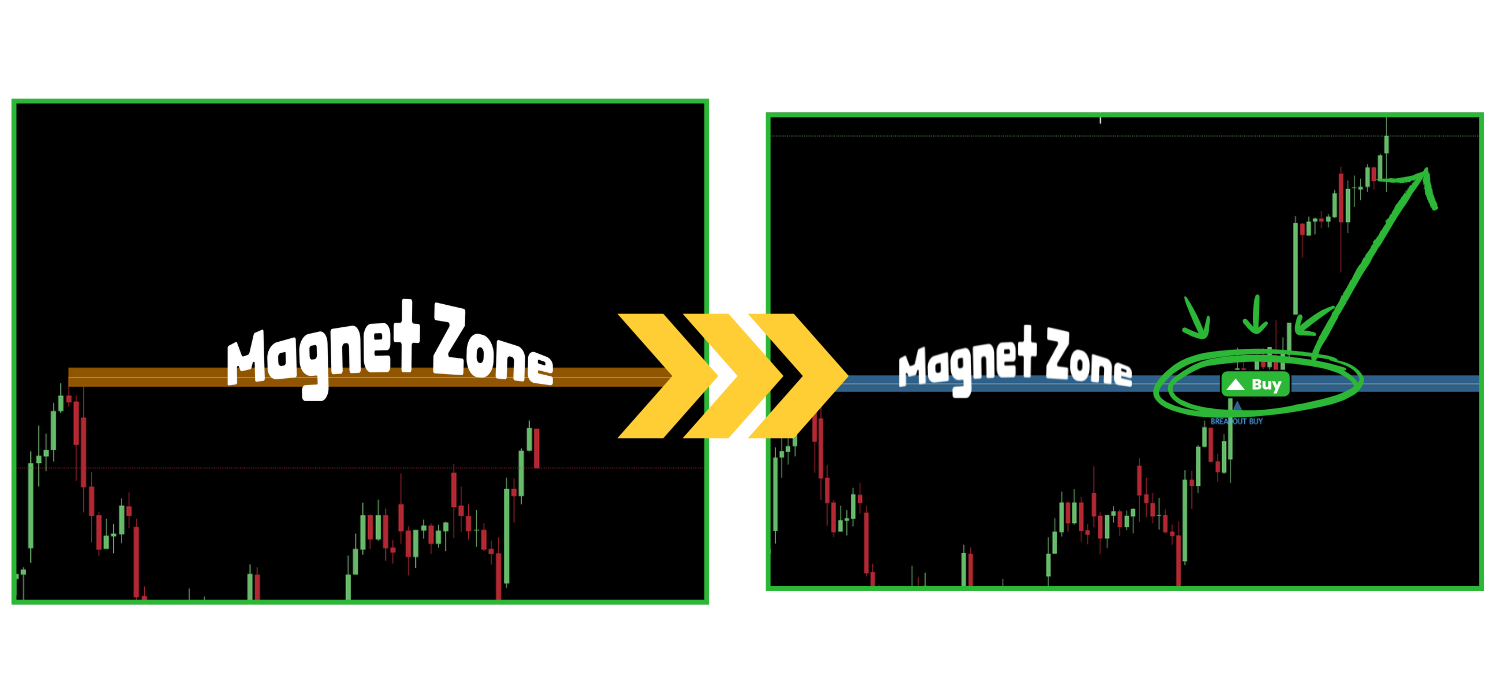
Alright, let’s cut to it. The Magnizone Indicator is number one because it solves the actual problems I just laid out. I built this thing because I was sick of the guesswork and the lagging indicators. Magnizone doesn’t just plot lines; it identifies and draws dynamic zones of support and resistance on your TradingView chart. And it does it based on truly significant price action, not just arbitrary pivots or repainting algorithms.
What’s different? Magnizone uses a proprietary algorithm that filters out market noise and focuses on where the big money is actually reacting. It looks at historical price action but then adapts in real-time to current market structure. This means the zones it draws are fresh, relevant, and actually hold up. You’ll see clear, defined areas where price has historically reversed or consolidated, but also where it’s likely to react next.
This isn’t just for pros. If you’re a beginner, Magnizone gives you objective areas to watch, so you’re not just guessing where to enter or exit. For experienced traders, it confirms your analysis and lets you focus on execution. It’s fully compatible with TradingView, obviously. And here’s the kicker: it comes with customizable alerts. So, you get notified the moment price approaches or enters a key support or resistance zone. No more staring at charts, waiting for a setup. That alone is a massive time-saver and stress reducer.
It’s about precision, adaptability, and getting rid of the noise. Magnizone helps you see the market’s true structure, giving you an edge that other indicators just can’t match.
— Ben, Find Better Trades
So, there you have it. While there are some solid tools out there for identifying support and resistance, few truly nail the ‘automatic zone plotting’ and real-time adaptability required for trading today.
For me, the ability to get clear, dynamic zones with alerts makes all the difference. That’s why the Magnizone Indicator is my top pick every single time. It’s the one that gives you an edge.
From Find Better Trades
Know Exactly Where The Big Money Steps In
Auto-plots institutional support & resistance zones from pure price action — no more guessing at levels.
Frequently Asked Questions
What is the best support and resistance zone indicators for beginners?
For beginners, an indicator that automatically plots clear, non-repainting zones is essential. It reduces subjectivity and helps you identify key areas without needing extensive manual drawing skills. Tools like Magnizone Indicator are designed for this, offering visual clarity and alerts to guide your trading decisions.
Is Magnizone Indicator free?
No, the Magnizone Indicator is a premium tool. It’s built with advanced algorithms and offers features like dynamic zone plotting and customizable alerts that free community scripts simply can’t match in terms of reliability and performance. It’s an investment for serious traders looking for a consistent edge.
How do volume breakout indicators work?
Volume breakout indicators typically identify moments when price moves sharply out of a consolidation pattern, accompanied by a significant surge in trading volume. This combination of price movement and high volume suggests strong conviction behind the move. It can signal the start of a new trend or the continuation of an existing one.
Which support and resistance indicators are compatible with TradingView?
Most popular support and resistance indicators, including Pivot Points Standard, Volume Profile, Fibonacci Auto-Retracement, and community scripts, are compatible with TradingView. Our Magnizone Indicator is also fully integrated, running directly on the TradingView platform for seamless analysis and trading.
📈 Want More? Join Our Free Trading Community
- Trading Strategy Guides Telegram — daily strategy tips and market insights
- Find Better Trades Telegram — free trade signals delivered to your phone
- Find Better Trades on YouTube — live trade breakdowns and tutorials